

Projects, Tasks & Delivery —
All in One Place
Keep projects on track with dedicated client workspaces, task management, time tracking, and team collaboration — built into the same platform as your HCM and help desk tools. No switching between systems.
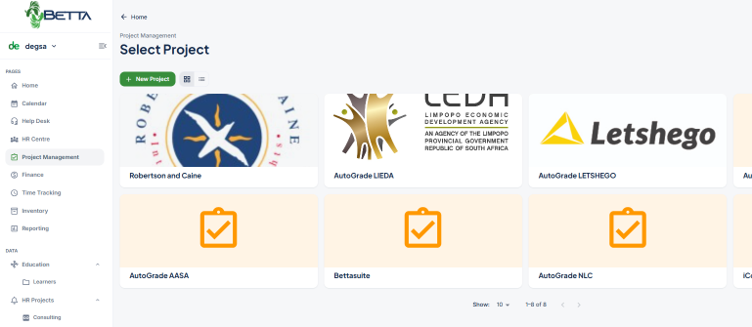
From Kickoff to Completion, Managed in One Place
BettaSuite's Project Management module gives every team a dedicated workspace per client or initiative. Each project has its own avatar, general info, planning dates, SLA defaults, task lists, board views, files, and comment threads — all in one connected workspace.
Used daily by Tremendis for real client engagements including Robertson and Caine, AutoGrade LIEDA, AutoGrade LETSHEGO, AutoGrade NLC, and AutoGrade AASA — battle-tested in live HCM consulting environments.
One Workspace, Two Audiences
Whether projects are run for your own teams or delivered for the clients you serve, the same workspaces, task management, and reporting apply.
Support, Guidance & Assistance for Your Team
Use Project Management as your organisation's internal delivery engine — initiatives, rollouts, and cross-department work all planned, assigned, and tracked in dedicated workspaces with full visibility for management.
Client Project Delivery, Built In
If your organisation is a Service Provider, the same Project Management module extends to client-facing delivery — dedicated client workspaces, SLA defaults, time tracking, and file sharing give external engagements the same structure and accountability as internal projects.
How a Project Moves Through BettaSuite
From the moment a project is created to the day it's delivered — every step tracked, assigned, and visible in real time.
Create Project
Name, code, description, start date, target end date, and default SLA — all set upfront
Build Tasks
Create tasks with title, assignee, priority, type, deadline, and state — flag what matters most
Collaborate
Share files, post comments, log time, and communicate — all stored inside the project record
Track Progress
Monitor task states, spot overdue items, and view completion in Kanban board or list view
Deliver
Mark complete, archive, and report. Time logs and task history retained permanently
Everything You Need to Run Projects with Confidence
Each feature is designed to reduce admin, improve visibility, and keep your team aligned — from the simplest task to the most complex delivery.
Milestone & Date Planning
Set project start dates, target end dates, and default SLAs. Track milestone completion and keep delivery on schedule — every deadline visible at a glance.
Kanban Board & List View
Switch between a drag-and-drop Kanban board (To Do / In Progress / Done) and a structured task list — manage projects the way your team works best.
Time Tracking
Start a timer directly from any task. Log billable and non-billable time per task — useful for client billing, resource planning, and SLA management.
File Collaboration
Upload, share, and manage files within each project. Every document stored against the correct project record — no more hunting through email threads.
In-Project Communication
Comments, updates, and decisions recorded within the project itself — creating a clear, searchable audit trail that keeps every conversation in context.
Help Desk Integration
Link project tasks directly to Help Desk tickets. When a support issue needs development work, your support and delivery teams stay perfectly aligned.
Everything a Team Needs, In One Workspace
Each project workspace is fully configured from creation — name, code, description, start date, target end date, and default SLA. Inside, your team has everything they need to deliver without switching tools.
Task List View
All tasks in one row — actions, title, flags, created date, state, priority, type, and assigned agent. Sortable and filterable by any column.
Kanban Board View
Visual drag-and-drop board with To Do, In Progress, and Done columns. Switch from list view at any time — same live data, different perspective.
Files Tab
All project documents and attachments stored and managed inside the project record — always findable, always in context.
Comments Tab
Full communication history stored inside the project. Every update, decision, and note captured and searchable in a clear timeline.
What's Included
Every BettaSuite Project Management workspace comes with the full feature set — no add-ons, no extra cost.
Works Better Together
Project Management doesn't exist in isolation inside BettaSuite. It connects directly to the modules your team already uses — giving you a complete picture of your workload, your people, and your progress without switching tools.
See All Features →